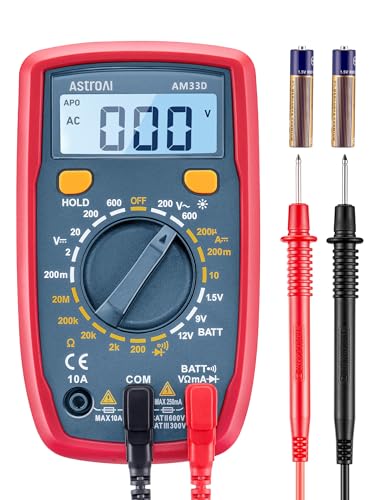
AstroAI
AstroAI AM33D
If you just need to check battery voltage and continuity, the AstroAI AM33D gets the job done for $23. It's not true RMS and the manual ranging will annoy you. But it's a meter that'll live in your toolbox for exactly when you need to quickly check something without worrying about damaging it.
Specifications
| Display Count | 2,000 |
| CAT Rating | CAT II 600V |
| DC Voltage | 0.1mV – 600V |
| AC Voltage | 1V – 600V |
| Current | 0.1mA – 10A |
Features
What We Like
- ✓Cheap enough to keep one in the car, shop, and toolbox simultaneously
- ✓Correct basic measurements for voltage, resistance, and continuity
- ✓Large, clear LCD display is easy to read in various lighting
- ✓Includes probes and 9V battery — actually ready to use out of the box
- ✓Safe enough for a first-time multimeter user to learn on
Limitations
- ✗Not true RMS — readings on AC loads (motors, dimmers) will be inaccurate
- ✗Manual ranging is slower than auto-ranging for quick checks
- ✗CAT II 600V only — not for panel or industrial use
- ✗Limited to basic measurements (no capacitance, no temperature)
Overview
The AstroAI AM33D is the meter you buy when you don't want to think about meters. At $23, it's cheaper than a decent dinner and more useful than most tools you'll impulse-buy at a hardware store. It measures AC/DC voltage, DC current, resistance, continuity, and diodes. It includes test leads and a battery. It even has a backlit display. For someone who just needs to check if a battery is dead or a fuse is blown, the value proposition is almost absurd.
But the AM33D is also a study in compromises. It is not true RMS, which means AC measurements on anything other than clean sine waves — motors, dimmers, switching power supplies — will be inaccurate. It has manual ranging only, so every measurement requires dialing in the right range instead of letting the meter figure it out. The CAT II 600V rating is adequate for household circuits but insufficient for panel work.
The real question is whether those limitations matter for what you're actually doing. If your electrical work consists of checking car batteries, testing wall outlets, and tracing speaker wires, the AM33D is probably all you need. If you're designing circuits, troubleshooting VFDs, or working in breaker panels, this meter will mislead you or potentially endanger you. This review is an honest look at what $23 buys and what it doesn't.
Design & Build Quality
The AM33D is compact and light — roughly 5.1 x 2.8 x 1.4 inches — with a yellow rubberized sleeve that provides basic drop protection. It's not rugged by any standard, but it survives the occasional fall off a workbench. The included test leads are thin-gauge PVC with small probe tips. They're adequate for household and automotive use but feel flimsy compared to even mid-range meters.
The LCD is surprisingly readable for the price. At 2000 counts (3½ digits), it shows readings up to 1999 with 0.1V or 0.1Ω resolution on lower ranges. The backlight is a genuine convenience for working in dim garages or under dashboards. A kickstand on the back props the meter at a readable angle on a bench, and the data hold button freezes readings when you can't see the display.
The rotary dial is the weak point of the physical design. It's stiff, the detents are mushy, and it's easy to land between ranges. This matters more on a manual-ranging meter than an auto-ranging one — you need confidence that the dial is exactly where you think it is. The included 9V battery drops into a compartment secured by a small screw, which is standard for this price class.
Performance & Specifications Deep Dive
The 2000-count display is the fundamental limitation. On the 20V DC range, you get 0.01V resolution, which is fine for checking a 12V car battery. On the 200V range, resolution drops to 0.1V, which is still adequate for household 120V circuits. But you can't resolve millivolts at all, making this meter useless for precision electronics work.
The lack of true RMS is the performance issue that matters most. Average-responding meters like the AM33D assume all AC waveforms are perfect sine waves. When you measure the output of a dimmer switch, a variable frequency drive, or a cheap switching power supply, the reading can be off by 20-40%. For checking if a wall outlet is live, this doesn't matter. For diagnosing motor loads or audio equipment, it does.
DC voltage accuracy is listed at ±(0.5% + 2), which sounds respectable. Community reports suggest real-world accuracy is closer to ±1-2% on the higher ranges, which is still acceptable for household and automotive use. Resistance measurement works for basic continuity and component checks, though the low resolution means small value resistors are hard to verify precisely.
Current measurement is DC only — there is no AC current range. The 10A range uses an un-fused 10A shunt, which means a sustained overload could damage the meter or create a safety hazard. The manual explicitly warns against leaving the meter in current mode connected across a voltage source, which would create a short circuit. This is standard multimeter safety, but the lack of a separate high-current fused input is notable.
Software & User Experience
There is no software, no connectivity, and no auto-ranging. The AM33D is as analog-digital as it gets: you select the function, choose the range, connect the leads, and read the number. For experienced users, this is simple and fast. For beginners, manual ranging is a learning curve — connect to a 120V outlet with the dial on the 20V range and you'll get an overload reading (or worse).
The user experience is deliberately minimal. The display shows the value, the range, and basic indicators for polarity and low battery. There is no bar graph, no min/max, no relative mode. The continuity beeper works for resistances below some threshold (typically under 50Ω), but it's not lightning-fast. The diode test applies enough voltage to light up most LEDs, which is actually useful for quick polarity checks.
For first-time multimeter users, the simplicity is arguably a feature. There are no nested menus, no mode buttons to forget, no connectivity issues. The instruction manual is clear and includes basic safety guidance. AstroAI's product page notes this meter is designed for beginners, and that positioning is honest. The meter teaches you to think about what you're measuring because it won't do it for you.
Real-World Use Cases
Automotive diagnostics is where the AM33D sees the most legitimate use. Checking battery voltage, testing fuses, verifying alternator output, and tracing simple 12V circuits are all within its capability. The 20V DC range handles automotive electronics nicely, and the backlit display is genuinely helpful under a dashboard. I've used it successfully to find a blown fuse in a home theater setup and to verify a car battery was holding charge.
Household electrical checks work fine within limits. Verifying that an outlet is wired correctly (with the help of a separate outlet tester), checking doorbell transformer voltage, and testing continuity on lamp cords are all straightforward. The CAT II 600V rating is adequate for these applications. However, you should not use this meter inside a breaker panel or on any high-energy circuit — the safety margin simply isn't there.
Basic electronics troubleshooting is possible but limited. You can check if a resistor is roughly the right value, verify a power supply is outputting approximately the right voltage, and test continuity on through-hole PCBs. But without millivolt resolution and true RMS, you can't characterize power supplies, measure signal levels, or diagnose anything involving PWM or switching waveforms.
The AM33D fails completely at professional electrical work. No electrician would trust a CAT II meter in a panel, and the manual ranging slows down every measurement when speed matters. The lack of true RMS makes motor and VFD diagnostics unreliable. This is a consumer-grade tool, not a professional one.
Who Should Buy (And Who Shouldn't)
Buy the AstroAI AM33D if you need a basic multimeter for occasional household electrical checks, car battery testing, and simple continuity verification. It's perfect for homeowners who want to diagnose a dead outlet, check Christmas light strings, or verify a car battery before calling a mechanic. At $23, it's cheap enough to keep one in the car, one in the toolbox, and one in the kitchen drawer.
Don't buy the AM33D if you do any kind of professional electrical work, electronics design, or troubleshooting of non-sinusoidal AC loads. The lack of true RMS, manual ranging, low resolution, and CAT II safety rating make it unsuitable for anything beyond basic low-stakes measurements. If you're building circuits, working on breaker panels, or diagnosing motors, spend the extra $25-35 for a meter that won't mislead you or create a safety risk.
Alternatives Worth Considering
The UNI-T UT61E+ at ~$50 is the logical step up for anyone who needs more than the AM33D offers. It adds true RMS, auto-ranging, 22000-count resolution, USB data logging, and significantly better accuracy. The build quality is still budget-grade, but the feature set transforms what's possible. For an extra $25, it's the best upgrade path from the AM33D.
The Klein MM400 at ~$60 is the choice for anyone doing home electrical work who wants genuine safety certification. It adds true RMS, CAT III 600V rating, auto-ranging, temperature measurement, and a much more rugged build. If you're regularly working on household wiring or HVAC, the MM400's safety margin and convenience are worth the extra money.
For pure price sensitivity, the AM33D has few competitors at $23. Even other budget meters in the $15-25 range typically offer similar or worse specs. The AM33D's inclusion of a backlit display, decent LCD, and functional test leads makes it one of the better options in the ultra-budget category. Just go in with realistic expectations about what $23 buys.
Frequently Asked Questions
Can the AstroAI AM33D measure AC current?
Is the AM33D safe for household electrical work?
How accurate is the AM33D for battery testing?
Why does the meter show strange readings on AC outlets?
Can I use this meter for electronics projects?
Does the AM33D have auto-ranging?
What happens if I accidentally leave it in current mode and connect to voltage?
AstroAI AM33D
$14.59 — CAT II 600V · 2,000 count