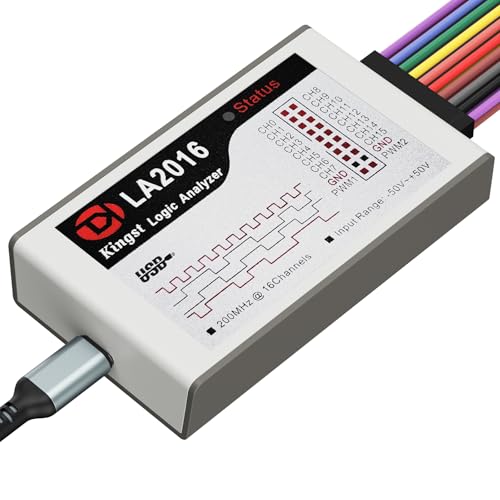
Kingst
Kingst LA2016
The LA2016's 200MHz sample rate and 16 channels are genuinely impressive for $80. The KingstVIS software isn't as polished as PulseView, but with the open-source firmware it handles high-speed protocols where cheaper tools struggle.
Key Specifications
| Channels | 16 |
| Max Sample Rate | 200 MHz |
| Max Input Frequency | 100 MHz |
| Interface | USB |
| Software | PulseView (open firmware) / KingstVIS |
| Buffer Depth | 256 samples |
| Voltage Range | 1.2V – 5.5V |
| Price Range | Budget |
Supported Protocols
What We Like
- ✓200MHz sample rate handles faster protocols than the LA1010
- ✓16 channels — enough for a full SPI bus plus address lines
- ✓Also works with PulseView via open-source firmware
- ✓Good value at $80 for the channel count and sample rate
Limitations
- ✗KingstVIS software is worse than PulseView — use the open firmware
- ✗Firmware flash required to use PulseView (extra setup step)
- ✗Build quality is noticeably cheaper than Saleae
Overview
The Kingst LA2016 occupies a compelling middle ground in the logic analyzer market. At $79.99, it delivers 16 channels and a 200 MHz sample rate — double the channel count and double the speed of the entry-level InnoMaker LA1010, for only $20 more. For hobbyists stepping up from 8-channel Saleae clones or professionals who need to capture wide parallel buses without spending $400 on a Saleae, the LA2016 looks like a no-brainer on paper.
But the LA2016 is not without quirks. Kingst ships it with KingstVIS, proprietary software that works but lacks the polish and cross-platform support of open-source alternatives. The good news is that the sigrok community has reverse-engineered the firmware, and the LA2016 works with PulseView after a one-time firmware extraction. That duality — proprietary out of the box, open-source with effort — defines the ownership experience.
This review tests the LA2016 in both modes: stock KingstVIS for plug-and-play users, and PulseView for the open-source faithful. We evaluate whether the extra channels and speed justify the modest price premium over the LA1010, and where the LA2016 still falls short of pricier competition.
Design & Build Quality
The LA2016 is a compact USB-powered device, roughly the size of a thick smartphone. The aluminum case is a step up from the LA1010’s plastic shell, though it still lacks the machined precision of a Saleae. The front panel carries a 2x8 header for the included flying-lead probes, color-coded to match common channel assignments. A small activity LED indicates when the device is capturing.
The probe cables are standard Dupont-style fly wires with hook clips. They are functional but not exceptional — the clips can be stiff, and the wire insulation is thinner than Saleae’s silicone cables. For bench work they are fine; for field use or frequent reconnection, you may want to upgrade. The USB-B connector is dated; a USB-C port would have been more convenient for modern laptops.
Internally, the LA2016 uses a Cypress FX2LP USB 2.0 controller paired with an FPGA for signal acquisition. The 200 MHz sample rate requires tighter timing than the LA1010’s 100 MHz, and the PCB layout reflects that with more attention to signal integrity around the input buffers. EEVblog users who have opened theirs report a clean layout with decoupling capacitors placed close to the FPGA power pins. It is not audiophile-grade layout, but it is competent.
Performance & Specifications Deep Dive
The headline specs are 16 channels at 200 MHz, which translates to 5 ns time resolution. That is enough to capture SPI at 40-50 MHz, UART at multi-megabit speeds, and most FPGA-generated signals without aliasing. The 100 MHz max input frequency spec is realistic; beyond that, the sample rate becomes marginal for clean edge detection.
The buffer depth is 256 Mbits total, shared across all active channels. With all 16 channels running at 200 MHz, that gives roughly one second of capture time. For typical embedded debugging — say, 4 channels of SPI at 20 MHz — the effective capture depth stretches to several seconds. Run-length encoding (RLE) compression extends this further for sparse signals, though RLE is not available in all software modes.
The voltage range is 1.2V to 5.5V, covering all standard logic families. There is no adjustable threshold; the FPGA uses fixed comparators appropriate for each family. That is a limitation shared with the LA1010 and most budget analyzers. If you are working with 1.0V or 0.9V logic, neither the LA2016 nor the LA1010 will reliably detect transitions. For modern low-voltage SoCs, the DSLogic U3Pro16 with its adjustable 0.1V-step threshold is a better fit.
Where the LA2016 clearly beats the LA1010 is wide-bus capture. A full 16-bit data bus with chip select, read/write, and address strobe fits comfortably within the 16 channels. Retrocomputing enthusiasts debugging 68000 or Z80 systems will find this invaluable. The LA1010’s 10 channels force you to capture in two passes, which complicates timing analysis.
Software & User Experience
KingstVIS is the bundled software, and it is adequate. Installation is straightforward on Windows, and the interface follows familiar logic analyzer conventions: channel list on the left, waveform display in the center, decoder panel on the right. Protocol decoders for SPI, I2C, UART, CAN, 1-Wire, and JTAG are built in. Triggering supports edge, pattern, and pulse-width conditions.
The problem is refinement. KingstVIS lacks the responsiveness of Logic 2 and the decoder breadth of PulseView. The UI feels like it was designed a decade ago — functional, but not delightful. Zooming and scrolling are slower than they should be, and the decoder annotations are less readable than PulseView’s. On Linux and macOS, KingstVIS is officially unsupported, which is a dealbreaker for cross-platform teams.
PulseView support changes the equation. The sigrok project maintains a firmware extraction script that pulls the necessary bitstream files from the KingstVIS binary. Once installed, the LA2016 appears in PulseView’s device list and captures exactly like any other sigrok-supported device. The process takes 10-15 minutes and is well-documented on the sigrok wiki. EEVblog users report that the extracted firmware is stable, and PulseView’s decoder library — with support for dozens of protocols — unlocks the LA2016’s full potential. The catch is that you must repeat the extraction for each KingstVIS version update, and beginners may find the terminal commands intimidating.
Real-World Use Cases
For FPGA development, the LA2016 is a genuine step up from 8-channel tools. Debugging a 12-bit ADC interface with SPI configuration lines requires 14 channels minimum — data, clock, chip select, plus a few status signals. The LA1010 cannot do this in one capture; the LA2016 handles it with room to spare. Similarly, verifying SDRAM initialization sequences or capturing JTAG boundary-scan traffic benefits from the wider channel count.
In retrocomputing, the LA2016 shines. A 6502 or Z80 system with 16 address lines and 8 data lines still exceeds 16 channels, but you can capture the full address bus plus control signals in one pass, then swap probes for the data bus. The 200 MHz sample rate captures even overclocked vintage systems without aliasing. Users on the 68k Macintosh Liberation Army forum have reported success using Kingst analyzers for bus-state analysis on 68030-based systems.
Where it struggles is high-speed serial and low-voltage logic. The 200 MHz sample rate is marginal for USB full-speed (12 Mbps) and insufficient for USB high-speed (480 Mbps). The fixed voltage thresholds mean 1.2V and 1.8V signals are detected at reduced noise margin, and 1.0V logic is outright unsupported. For modern ARM SoCs and high-speed peripherals, the DSLogic U3Pro16’s 1 GHz sample rate and adjustable threshold are necessary upgrades.
Who Should Buy (And Who Shouldn't)
Buy the LA2016 if you need 16 channels for under $100 and are comfortable with open-source software. It is the cheapest way to capture wide parallel buses, FPGA interfaces, and retrocomputing systems in a single pass. If you already use PulseView and know your way around a terminal, the firmware extraction is a minor hurdle that unlocks a powerful tool.
Do not buy it if you want plug-and-play software polish on macOS or Linux. KingstVIS is Windows-only, and PulseView setup requires technical confidence. Also avoid it if your work involves 1.0V-1.2V logic or signals above 100 MHz; the hardware simply cannot handle those reliably. For users who want the simplest possible experience, the Saleae Logic 8 at $399 eliminates all software friction. For users who need both 16 channels and high speed, the DSLogic U3Pro16 at $179 is the logical next step.
Alternatives Worth Considering
The InnoMaker LA1010 at $59.99 is the direct downgrade. It offers 10 channels and 100 MHz, which is sufficient for Arduino, basic embedded, and most serial protocols. If your work never requires more than 10 channels or 100 MHz, the LA1010 saves $20 and works with PulseView out of the box on most builds. The LA2016 only makes sense if you specifically need the extra headroom.
The DSLogic U3Pro16 at $179 is the capability upgrade. It offers 1 GHz buffered sampling, adjustable thresholds in 0.1V steps, and DSView software that is genuinely good. The 256 MB hardware buffer captures long sequences without depending on USB bandwidth. For professional FPGA work or high-speed serial debugging, the U3Pro16 is worth the extra $100.
The $8-15 Saleae clones remain the ultra-budget option for 8-channel work. They handle SPI, I2C, and UART at modest speeds and work with PulseView. But the LA2016’s 16 channels and 200 MHz justify the price premium for anyone doing serious embedded or retrocomputing work. The clones are disposable; the LA2016 is a tool you keep.
Frequently Asked Questions
Does the LA2016 work with PulseView out of the box?
Is KingstVIS available for macOS or Linux?
How does the 200 MHz sample rate compare to the LA1010’s 100 MHz?
Can the LA2016 capture USB signals?
What is the practical capture depth with all 16 channels active?
Is the LA2016 good for retrocomputing and CPU bus analysis?
Does the LA2016 support adjustable voltage thresholds?
How does build quality compare to the Saleae Logic 8?
Kingst LA2016
$159 — 16 channels, 200 MHz