Dangerous Prototypes
Bus Pirate 5
The Bus Pirate 5 isn't a pure logic analyzer — it can also talk to chips directly, making it uniquely useful for hardware hacking and debugging unknown protocols. A great second tool for someone who already has a basic analyzer.
Key Specifications
| Channels | 8 |
| Max Sample Rate | 40 MHz |
| Max Input Frequency | 20 MHz |
| Interface | USB |
| Software | Terminal / web UI |
| Buffer Depth | 1 samples |
| Voltage Range | 1.2V – 5.5V |
| Price Range | Budget |
Supported Protocols
What We Like
- ✓Does more than analyze — can also talk to chips directly
- ✓Invaluable for hardware hacking and debugging unknown protocols
- ✓Cheapest tool with protocol interaction capability
- ✓Open-source hardware and firmware
- ✓Strong community on Hackaday and Dangerous Prototypes forum
Limitations
- ✗Not a pure logic analyzer — limited capture depth for waveform analysis
- ✗Slower sample rate than dedicated analyzers
- ✗Better as a second tool than a primary logic analyzer
Overview
The Bus Pirate 5 is not a traditional logic analyzer, and that is exactly why it belongs in this comparison. At $45, it is a Swiss Army knife for digital protocol debugging: UART, SPI, I2C, 1-Wire, JTAG, CAN, and more, all accessible through a single USB-C connection and an interactive terminal interface. For hobbyists who debug embedded systems, the Bus Pirate 5 replaces a drawer full of adapters, level shifters, and specialized cables with one compact tool.
Dangerous Prototypes has been building Bus Pirates since 2008, and the fifth generation represents a complete rethink. Gone is the FT232 USB chip and the fixed-voltage IO. The BP5 uses an RP2040 microcontroller with programmable IO pins that can operate from 1.8V to 5V, eliminating the level-shifting headache that plagues every other tool in this comparison. The color LCD screen shows real-time voltage, pin states, and protocol activity without requiring a computer.
The trade-off is scope. The Bus Pirate does not capture long traces like a Saleae or decode dozens of protocols simultaneously like a DSLogic. What it offers is immediacy: connect to a device, type a few commands, and see exactly what is happening on the bus right now. For iterative debugging and protocol exploration, that immediacy is often more valuable than deep capture memory.
Design & Build Quality
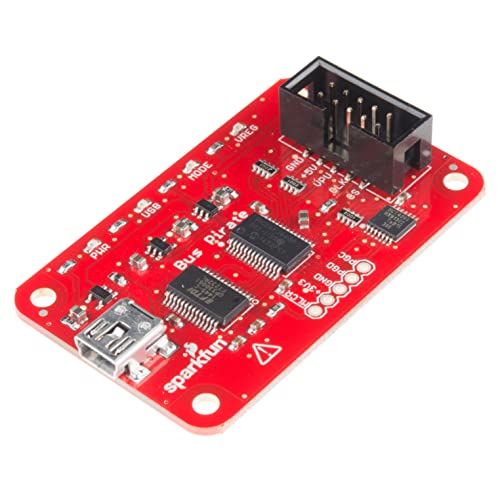
The Bus Pirate 5 measures 60 x 35 x 12 mm and weighs under 20 grams. It is genuinely pocketable in a way that no other logic analyzer is. The USB-C connector is the only physical interface; a 10-pin ribbon cable breaks out the IO pins, power, and ground. The cable is included and uses standard 0.1-inch pitch, so you can replace it with longer cables or breadboard jumpers easily.
Build quality is functional rather than premium. The PCB is bare on the bottom with the RP2040, flash chip, and voltage regulators visible. The top side has a 1.3-inch color LCD, a directional button, and the USB-C port. The LCD is surprisingly readable for its size, showing pin labels, voltage levels, and a simple activity graph. The button is used for menu navigation and confirm/cancel actions.
The IO pins are the star feature. Each pin is individually programmable from 1.8V to 5V via an internal level shifter, and the Bus Pirate can source or sink up to 100mA per pin for light device powering. This means you can debug a 1.8V sensor, a 3.3V Arduino, and a 5V vintage computer without any external adapters. No other tool in this comparison offers this flexibility.
Performance & Specifications Deep Dive
The RP2040 runs at 125 MHz with dual cores, giving the Bus Pirate 5 enough headroom for real-time protocol interaction at megabit speeds. The official documentation lists support for UART up to 12 Mbps, SPI up to 33 MHz, and I2C at 1 MHz. In practice, hobbyist I2C rarely exceeds 400 kHz and SPI on Arduinos is usually under 8 MHz, so the Bus Pirate is comfortably fast enough for typical embedded work.
Capture depth is essentially unlimited in terms of time, but the Bus Pirate does not store traces like a traditional analyzer. Instead, it streams data to the terminal or acts as a live bridge. For example, you can set it to sniff an I2C bus and print every byte to your terminal in real time. The limitation is that you cannot scroll back through a long capture without terminal history, and there is no visual timing analysis like you get with PulseView.
The LCD screen provides a simple logic analyzer view with a rolling waveform display. It is useful for quick checks — verifying that a clock is running, seeing that data toggles, checking voltage levels — but it lacks the detail and measurement tools of PC-based software. Think of it as a sanity check, not an analysis tool.
Software & User Experience
The Bus Pirate 5 interface is a text terminal accessed via USB serial. Connect it, open a serial terminal at 115200 baud, and you get an interactive prompt. Type commands like `m` for mode selection, `W` to enable power supply, `v` to read voltages, or protocol-specific commands like `[0x68 0x00 r]` for an I2C read. The learning curve is shallow for anyone comfortable with a command line, and the built-in help system explains every command.
The new web interface is a significant addition. A built-in HTTP server serves a browser-based terminal and data viewer, eliminating the need for a separate serial terminal program. The web UI includes syntax highlighting, command history, and a simple data plotter. It works on any device with a browser, including tablets and phones.
For users who want PC software integration, the Bus Pirate 5 is supported by sigrok as a logic analyzer source. This bridges the gap between the interactive terminal workflow and traditional capture-and-analyze workflows. The sigrok support is relatively new and may not expose every feature, but basic capture and decoding work reliably.
Real-World Use Cases
For Arduino and sensor debugging, the Bus Pirate 5 is genuinely transformative. Connect to an I2C temperature sensor, type a few commands to read the registers, and verify that the sensor responds correctly. No wiring diagrams for level shifters, no guessing about pull-up resistors, no fighting with Arduino libraries. The Bus Pirate handles the electrical layer and lets you focus on the protocol.
For vintage computer restoration and retrocomputing, the programmable voltage levels are essential. Many 1980s computers use 5V logic, some early 1990s systems use 3.3V, and oddball hardware might use anything in between. The Bus Pirate adapts to all of them without external hardware. The community has built extensive documentation for communicating with classic chips, EPROMs, and peripheral controllers.
Where the Bus Pirate struggles is in long-duration debugging. If you are trying to catch an intermittent SPI communication error that happens once every ten minutes, a traditional logic analyzer with deep memory and triggers is the better tool. The Bus Pirate is for active exploration, not passive monitoring. Similarly, multi-protocol analysis — watching SPI and UART simultaneously with precise timing correlation — is better handled by a multi-channel analyzer like the Saleae Logic 8.
Who Should Buy (And Who Should Not)
Buy the Bus Pirate 5 if you work with embedded systems, sensors, or digital protocols and want an immediate, no-setup debugging tool. It is the fastest way to verify that a device is alive, read its registers, and understand its protocol. Also buy it if you work with mixed voltage systems — the programmable IO eliminates level-shifting headaches entirely.
Buy it if you value portability and simplicity over deep analysis. The Bus Pirate fits in a pocket, requires no software installation (just a browser), and works on any operating system. It is the tool you reach for when you need an answer in thirty seconds, not a detailed timing diagram.
Do not buy the Bus Pirate 5 if you need long capture traces, visual timing analysis, or multi-protocol correlation. It is not a replacement for a Saleae or DSLogic in those use cases. Do not buy it if you are uncomfortable with command-line interfaces — while the web UI helps, the terminal is still the primary workflow.
Alternatives Worth Considering
The Saleae Logic 8 at $229 is the premium alternative for protocol debugging. It offers 8 digital channels, deep capture memory, and the best PC software in the industry. If your budget allows and you need visual timing analysis, the Saleae is worth the premium. But for basic protocol verification and register exploration, the Bus Pirate 5 does the same job at one-fifth the price.
The InnoMaker LA1010 at $65 is a traditional USB logic analyzer with 16 channels and PulseView support. It is a better choice if you need to capture long traces or work with wide parallel buses. However, it lacks the Bus Pirate's voltage flexibility and interactive terminal workflow.
For users who already own a Raspberry Pi Pico, the $4 PicoProbe firmware can emulate basic Bus Pirate functionality. It requires more setup and lacks the LCD screen and enclosure, but it is the absolute cheapest way to get similar capabilities. The Bus Pirate 5's value is in the polished hardware, documentation, and community support that justify the $45 price over a bare Pico.
Frequently Asked Questions
Is the Bus Pirate 5 a logic analyzer or something else?
Can it replace a Saleae Logic 8?
Does it work with 3.3V and 5V devices?
What protocols does it support?
Do I need to install software?
Bus Pirate 5
$39.99 — 8 channels, 40 MHz