InnoMaker
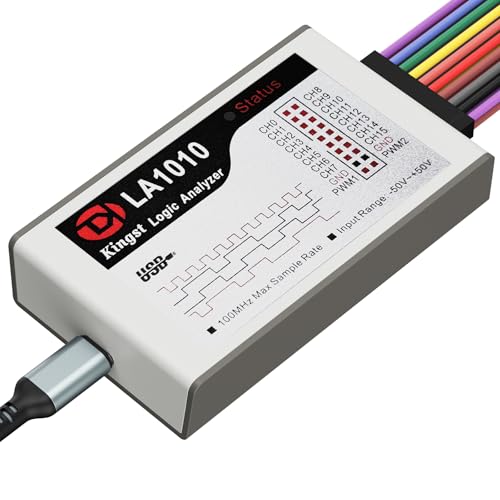
InnoMaker LA1010
The LA1010 is the RTL-SDR of logic analyzers — cheap, PulseView-compatible, and the community has solved every problem you'll run into. For under $60 there's nothing better for Arduino and basic protocol debugging.
Key Specifications
| Channels | 10 |
| Max Sample Rate | 100 MHz |
| Max Input Frequency | 50 MHz |
| Interface | USB |
| Software | PulseView (recommended) / KingstVIS |
| Buffer Depth | 10 samples |
| Voltage Range | 1.2V – 5.5V |
| Price Range | Budget |
Supported Protocols
What We Like
- ✓Works with PulseView — open-source, community-supported software
- ✓10 channels handles most SPI/I2C/UART debugging scenarios
- ✓Huge community on EEVblog and r/electronics with solved problems
- ✓100MHz sample rate accurate enough for most hobbyist protocols
- ✓USB-powered, no external supply needed
Limitations
- ✗KingstVIS software bundled — stick to PulseView instead
- ✗No standalone mode, requires a connected PC
- ✗Plastic enclosure feels cheap compared to Saleae
- ✗Limited to 10 channels (most pros want 16+)
Overview
At $59.99, the InnoMaker LA1010 is the definition of an impulse-buy logic analyzer. It offers 10 digital channels, a 100 MHz sample rate, and compatibility with the open-source PulseView software for less than the cost of a tank of gas. For Arduino tinkerers, embedded beginners, and anyone who has ever debugged SPI or I2C with LEDs and prayer, the LA1010 is a revelation. It is not the fastest, deepest, or most polished tool on the market, but it is the cheapest way to get legitimate protocol decoding on your bench.
The LA1010 is essentially a Kingst LA1016/LA1010-class device that has been embraced by the sigrok community. It uses the same Cypress FX2LP USB controller and FPGA architecture as many budget analyzers, but the PulseView ecosystem gives it software support that outlives the manufacturer’s own offerings. That is a crucial distinction: when InnoMaker eventually stops updating its bundled KingstVIS software, PulseView will still work.
The trade-offs are visible. Ten channels is enough for SPI, I2C, UART, and basic parallel work, but it falls short of the 16-channel sweet spot that FPGA developers prefer. The 100 MHz sample rate is accurate for hobbyist speeds but will miss nanosecond glitches that a DSLogic or Saleae would catch. And the plastic enclosure feels exactly as cheap as the price suggests. This review evaluates whether those compromises matter for the intended audience.
Design & Build Quality
The LA1010 is a compact USB dongle-style analyzer, roughly the size of a deck of cards. It draws power entirely from the USB port, so there is no wall wart to lose. The front edge carries a 2x5 header for the included flying-lead probes, color-coded in a rainbow that matches PulseView’s default channel colors. That is a thoughtful touch that makes setup faster.
The plastic case is lightweight and functional but unremarkable. It does not have the heft or precision molding of a Saleae, and the probe connector feels like it could loosen after years of heavy use. For a tool that lives in a drawer and comes out for occasional debugging, it is fine. For daily professional use, the mechanical robustness would be a concern.
Inside, the architecture is a Cypress FX2LP USB 2.0 controller paired with an FPGA. This is the same platform used by dozens of budget analyzers, and its maturity is an advantage. The sigrok project has reverse-engineered the protocol, so the LA1010 works with PulseView without proprietary drivers on Windows, macOS, and Linux. That cross-platform support is a genuine differentiator against tools that lock you to a single OS.
Performance & Specifications Deep Dive
The headline specs are 10 channels and 100 MHz sample rate. That translates to a 10 ns minimum detectable pulse width, which is more than adequate for Arduino (16 MHz), ESP32, and most STM32 work. SPI at 20 MHz, I2C at 400 kHz, and UART at 3 Mbps are all comfortably within the LA1010’s envelope. The buffer depth is modest — 10 Mpts per channel — but enough for capturing several seconds of traffic at moderate speeds.
The voltage range is 1.2V to 5.5V, covering all standard logic families from 1.8V to 5V. There is no adjustable threshold; the FPGA compares against fixed levels appropriate for each family. That works well for clean digital signals but can struggle with slow-rise or noisy lines. If you are debugging a board with termination issues or ground bounce, the LA1010 may show phantom transitions that a scope would clarify.
Where the LA1010 cannot compete is with high-speed or wide-bus work. Ten channels is enough for SPI (4 wires) plus a few control signals, but it will not capture a full 16-bit data bus with address and control lines. The 100 MHz sample rate is also too slow for USB 2.0 full-speed (12 Mbps) or high-speed (480 Mbps) signaling, though low-speed USB (1.5 Mbps) is decodeable. For those applications, the Kingst LA2016 or DSLogic Plus are the next step up.
Software & User Experience
The LA1010 ships with KingstVIS, InnoMaker’s branded version of the Kingst software. It works, but it is Windows-only and lacks the refinement of PulseView. The general consensus in the community — and the recommendation in this review — is to skip KingstVIS and install PulseView immediately. PulseView is free, open-source, and actively maintained by the sigrok project.
PulseView’s interface will be familiar to anyone who has used a logic analyzer before. Channels are listed on the left, the main area shows captured waveforms, and protocol decoders are applied as overlay annotations. Setting up a capture takes seconds: select sample rate, set a trigger (edge or pattern), and hit run. Decoders for SPI, I2C, UART, CAN, 1-Wire, JTAG, and dozens more are built in.
One frustration with the LA1010 specifically is that it is not natively supported in all PulseView versions. The LA1016 and LA2016 have upstream sigrok drivers, but the LA1010 sometimes requires specific firmware or a nightly build. EEVblog users have reported confusion about which Kingst models work out of the box. If you buy an LA1010, verify that your PulseView version recognizes it before committing to a project deadline. Once working, however, the experience is smooth and reliable for the tool’s intended speed class.
Real-World Use Cases
For Arduino and basic embedded debugging, the LA1010 is outstanding. A typical I2C sensor read failure that might take an hour to diagnose with print statements resolves in minutes with the LA1010. You can see exactly when the master sends the address, whether the slave ACKs, and whether the data bytes match your expectations. The protocol decoder annotates every transaction in human-readable form, turning cryptic square waves into "Write 0x50, ACK, Read 0x3A, NACK."
In SPI work, the LA1010 handles the four standard lines (MOSI, MISO, SCLK, CS) with room to spare for an interrupt or reset line. Debugging a flash memory write sequence or an OLED initialization routine is straightforward. The 100 MHz sample rate captures SPI at 10-20 MHz without aliasing, which covers most hobbyist and many professional embedded scenarios.
Where it struggles is with transient debugging. If you are hunting a rare glitch that lasts a few nanoseconds, the 100 MHz sample rate may miss it entirely. The lack of adjustable threshold means marginal signals near the logic threshold can trigger spurious captures. And for wide parallel buses — say, a 6502 CPU project with 16 address lines and 8 data lines — 10 channels is simply not enough. These are not design flaws; they are the expected limitations of a $60 tool.
Who Should Buy (And Who Shouldn't)
Buy the LA1010 if you are a beginner, a student, or an Arduino enthusiast who needs protocol decoding without spending $200+. It is the cheapest reliable entry point into logic analysis, and the PulseView ecosystem means you are not locked into proprietary software. If your work is dominated by I2C, SPI, UART, and basic digital signals under 50 MHz, the LA1010 is genuinely all you need.
Do not buy it if you need 16 channels for FPGA or retrocomputing work, if you require sample rates above 100 MHz for high-speed serial, or if you want polished software with premium support. The Kingst LA2016 at $80 adds 16 channels and 200 MHz, while the Saleae Logic 8 at $399 delivers a fundamentally more refined experience. Also avoid it if you are unwilling to tinker with open-source software; KingstVIS is functional but lacks the decoder breadth and UI polish that make PulseView worth the setup effort.
Alternatives Worth Considering
The Kingst LA2016 at $79.99 is the natural upgrade. It doubles the channels to 16 and doubles the sample rate to 200 MHz, with official PulseView support via an open-source firmware flash. The hardware is similarly budget-grade, but the extra channels and speed are meaningful for FPGA and faster embedded work. For $20 more, it is the better buy if your budget allows.
The $8-15 Saleae clones from AliExpress are the ultra-budget option. They use the same FX2LP chip and work with PulseView, but build quality is inconsistent and channel count is typically 8. If you are truly cash-strapped, they work. But the LA1010’s 100 MHz sample rate and 10 channels justify the modest premium for most users.
The Saleae Logic 8 at $399 is the premium alternative. Logic 2 software is years ahead of PulseView in polish, search capability, and analog-plus-digital capture. Whether that is worth nearly 7x the price depends on how much time you spend debugging and how much you value a frictionless workflow. For professionals, it is; for hobbyists, the LA1010 gets 90% of the job done at 15% of the cost.
Frequently Asked Questions
Does the LA1010 work with PulseView on Linux and macOS?
How many channels do I really need?
Can the LA1010 decode USB?
Is the LA1010 the same as the Kingst LA1010?
What is the maximum signal frequency I can capture?
Should I use KingstVIS or PulseView?
InnoMaker LA1010
$69 — 10 channels, 100 MHz
Compare Similar Logic Analyzers
Owner Notes
From the Bench
5 Logic Analyzer Mistakes I Made (So You Don't Have To)
Trigger settings that time out, noise immunity failures, probe grounding gotchas. The lessons from my first month of real protocol debugging.
I Spent 6 Hours Debugging a Sensor Dropout. The Logic Analyzer Saved Me in 10 Minutes.
Building a multi-sensor data logger, the I2C bus started dropping packets. Here's exactly how I diagnosed the problem using the Innomaker LA1010 and PulseView.
I Just Bought a Logic Analyzer for $60. Here's How to Actually Use It.
Setting up PulseView, configuring triggers, and decoding your first I2C transaction on the Innomaker LA1010. A practical walkthrough.
I Tested My USB Scope Against a $60 Logic Analyzer on I2C — Here's What Happened
Head-to-head: the Hantek DSO5072P (USB scope) versus the Innomaker LA1010 (budget logic analyzer) debugging I2C pull-up failures. One tool won immediately.