JDS Tech
JDS6600 DDS Signal Generator
The JDS6600 is the starting point for hobbyists who need a function generator but can't justify $300. Two channels, 60MHz, and a stack of waveforms for $76. The software is basic but functional. This is the scope equivalent of the Rigol DS1054Z — a solid first tool at an honest price.
Key Specifications
| Max Frequency | 60 MHz |
| Channels | 2 |
| Frequency Resolution | 0.01 Hz |
| Output Impedance | 50Ω nominal |
| Amplitude Range | 0 – 20Vpp (no load) |
| Display | 2.4" TFT color LCD |
| Connectivity | USB (PC software) |
| Arbitrary Waveform | Yes |
| Burst Mode | Yes |
Waveform Library
Modulation Types
What We Like
- ✓Two independent channels — test both input and output of a circuit simultaneously
- ✓60MHz maximum frequency covers audio, basic RF, and most hobbyist signals
- ✓20 built-in arbitrary waveforms beyond the standard set
- ✓Frequency sweep mode useful for filter characterization
- ✓PC software included for waveform editing (basic but functional)
Limitations
- ✗Output impedance is not precisely 50Ω — matters for RF matching
- ✗Harmonic distortion is higher than Rigol or Siglent at similar frequencies
- ✗TFT display is small and viewing angles are poor
- ✗PC software requires Windows and is not actively maintained
Overview
At $75.99, the JDS6600 occupies a sweet spot that barely existed a decade ago: a dual-channel DDS signal generator with 60 MHz sine output, arbitrary waveform capability, and a color display for less than the cost of a decent dinner out. It is the spiritual successor to the MHS-5200 and FeelTech FY3200 families, and in many ways it corrects the sins of those earlier budget generators. The question is not whether it is cheap — it unquestionably is — but whether it is cheap in the ways that matter for real bench work.
For hobbyists building audio circuits, testing filters, or debugging microcontroller PWM outputs, 60 MHz is overkill in a good way. The two independent channels mean you can feed a test signal into one side of a circuit and a reference into the other, then observe both on your scope. That alone saves hours of cable swapping. The built-in frequency counter (up to 100 MHz) and pulse counter are genuine value-adds, not afterthoughts.
But the JDS6600 is still a sub-$100 instrument, and the compromises are visible if you know where to look. The output impedance is nominally 50Ω but community measurements on EEVblog show it is not tightly controlled. Harmonic distortion on sine waves above 10 MHz creeps past the -40 dBc specification when pushing full amplitude. And the PC software, while functional, is a Windows-only LabView application that has not seen a meaningful update in years. This review tests where the JDS6600 punches above its weight and where it falls into the expected budget-generator traps.
Design & Build Quality
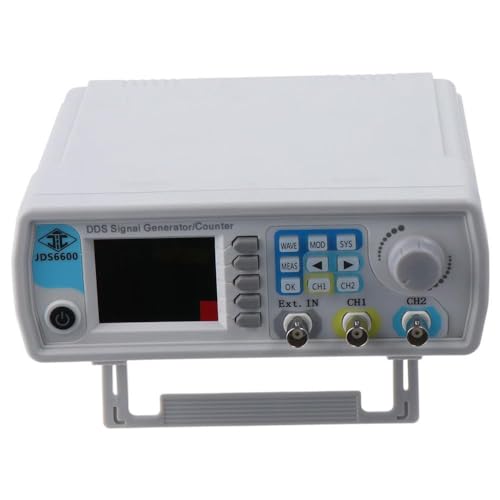
The JDS6600 sits in a compact plastic enclosure that feels utilitarian rather than premium. At roughly 194 x 178 x 69 mm, it does not demand much bench space, and the rubber feet keep it from sliding around. The front panel packs two BNC outputs, a single BNC input for the frequency counter, a USB-B port, and a small 2.4-inch TFT color LCD.
The display is functional but unimpressive. Viewing angles are narrow, and in bright overhead lighting the waveform preview becomes hard to read. You will find yourself leaning over the unit more often than you would with a Siglent or Rigol. The rotary encoder has decent detents, but the surrounding membrane buttons feel mushy and occasionally require a second press to register. Independent tests from Elektor Magazine noted the same casing cheapness, calling it a place where the manufacturer could have invested more.
Inside, the teardown community has identified an Altera FPGA (Cyclone IV family) driving the DDS core, paired with a 14-bit DAC running at 266 MSa/s. The output stage uses an AD8056A voltage feedback amplifier, an AD835 multiplier, and an AD8017 high-drive op amp per channel. That is a surprisingly respectable analog chain for the price, though the relays used for output attenuation introduce audible clicking when amplitude ranges switch.
Performance & Specifications Deep Dive
The headline 60 MHz applies only to sine waves; square and triangle waves top out at 15 MHz, while pulse, arbitrary, and TTL outputs are limited to 6 MHz. That is standard DDS behavior at this price tier, but it is worth internalizing before you buy. If you need clean square edges above 10 MHz, look elsewhere.
On the bench, the sine output at 1 MHz is genuinely clean. Independent tests show better than 45 dB harmonic distortion below 1 MHz and around 40 dB up to 20 MHz, which is respectable for a generator under $100. The frequency accuracy is specified at ±20 ppm, and stability is rated at ±1 ppm over three hours. In practice, that means your 10.000 kHz signal stays within a few hertz for an afternoon session.
Where the JDS6600 struggles is at the frequency extremes with full amplitude. The output is rated for 20 Vpp up to 10 MHz, then drops to 10 Vpp from 10-30 MHz, and 5 Vpp above 30 MHz. EEVblog user vk2seb measured the second harmonic at about -30 dBc when running a 10 MHz sine at 20 Vpp into 50 Ω, which is outside the published spec. Dropping the amplitude or moving to 25 MHz cleaned the output back to roughly -40 dBc. The takeaway: this generator can do 60 MHz, but it does its best work below 30 MHz at moderate amplitudes.
The arbitrary waveform memory holds 60 user-defined shapes at 2048 points each. That is enough for simulating sensor outputs or power supply ramp profiles, but the 14-bit vertical resolution and modest memory depth mean complex arb shapes will show stepping if you zoom in with a good scope.
Software & User Experience
The JDS6600 can be operated entirely from the front panel, which is how most users will interact with it day to day. The menu structure is logical enough: press a waveform key, dial in frequency with the encoder, and adjust amplitude with the dedicated buttons. Sync mode links CH1 and CH2 so changes to one apply to both, which is useful for differential drive or phase-offset testing.
The bundled PC software is where things get dated. It requires Windows, installs via a CD (or a downloaded RAR), and is built in LabView. Once running, it mirrors the front panel controls in a virtual interface and allows waveform upload. Connection is over a virtual COM port at 115200 baud. A Japanese user blog noted that the software does work on Windows 10, but the control documentation is minimal and omits burst mode, sweep, and arbitrary waveform upload instructions.
There is no macOS or Linux support, and no SCPI command set for scripting. If you need automated test sequences, the JDS6600 is the wrong tool. For occasional PC control — say, uploading a custom waveform once and then operating standalone — it is tolerable. But community reports suggest the software crashes or loses USB connection on some Windows builds, requiring a reconnect.
Real-World Use Cases
For audio circuit development, the JDS6600 is genuinely pleasant to use. A 1 kHz sine into a headphone amp, a 20 Hz-to-20 kHz sweep for filter characterization, or a pair of phase-locked tones for intermodulation testing are all straightforward. The sweep mode supports linear and logarithmic ramps with adjustable start, stop, and dwell times, which is more than enough for verifying crossover networks or op-amp stability margins.
In the embedded world, the 6 MHz pulse output with adjustable width is handy for simulating encoder signals or driving stepper motor controllers. The TTL output gives you a 3.3V logic-level square wave without needing an external level shifter. The built-in frequency counter, accepting signals from 1 Hz to 100 MHz, is accurate enough to verify crystal oscillator frequencies or PWM duty cycles without tying up your scope.
Where it frustrates is RF work. The 60 MHz sine is real, but the spectral purity degrades quickly above 30 MHz, and the output impedance mismatch becomes noticeable when feeding transmission lines or RF mixers. One user on a Japanese blog tested 50 MHz output and measured SFDR around 40 dB, calling it borderline for use as a radio carrier. For hobbyist HF work it is passable; for anything demanding clean harmonics, you need a Rigol or Siglent.
Who Should Buy (And Who Shouldn't)
Buy the JDS6600 if you are a beginner or hobbyist who needs a versatile signal source for audio, basic embedded, or educational work. It is the right first generator: cheap enough that you will not cry if you blow the output stage, capable enough that you will not outgrow it for at least a year, and simple enough that you can be generating waveforms within minutes of unboxing. Students, Arduino enthusiasts, and audio tinkerers fall squarely into this camp.
Do not buy it if you need precise 50 Ω impedance matching for RF circuits, if you require automated remote control via Python or MATLAB, or if signal purity below -50 dBc is non-negotiable. Professional engineers doing production test, RF hobbyists working above HF, or anyone who values software polish will find the JDS6600’s limitations maddening. In those cases, stepping up to the FeelTech FY6600, Rigol DG1022Z, or Siglent SDG1032X is money well spent.
Alternatives Worth Considering
The FeelTech FY6600 at roughly $100 sits in the same budget tier and offers a nearly identical analog performance envelope: 60 MHz sine, two channels, PC software. The FY6600 has a larger 3.5-inch display and an active community sharing custom waveforms, but it also carries a notorious history of firmware bugs and power supply noise issues on early revisions. The JDS6600 feels more stable out of the box, though the FY6600’s PC software is slightly more capable.
The Rigol DG1022Z at $249 is the next meaningful step up. You trade maximum frequency (25 MHz versus 60 MHz) for dramatically better signal purity, a genuine 50 Ω output, LAN connectivity, and a 14-bit DAC that is measurably cleaner. If you own a Rigol scope, the integration alone justifies the premium.
For pure audio work under $100, also consider the MHS-5200A, which is essentially the JDS6600’s predecessor. It lacks the color display and some waveform options but can often be found for $40. The JDS6600 is the better buy at current pricing unless you are pinching every penny.
Frequently Asked Questions
Can the JDS6600 output a true 60 MHz sine wave?
Does the JDS6600 work with Linux or macOS?
How accurate is the built-in frequency counter?
Can I upload custom arbitrary waveforms?
Is the output impedance really 50 Ω?
What is the difference between the JDS6600 and the MHS-5200A?
JDS6600 DDS Signal Generator
$118.99 — 60 MHz · 2ch