FeelTech
FeelTech FY6600
The FeelTech FY6600 is the value play between the JDS6600 and the Rigol DG1022Z. The PC software makes programming arbitrary waveforms easier than fighting the front panel, and the counter mode is actually useful. Not as clean as the Rigol but a big step up from the JDS6600.
Key Specifications
| Max Frequency | 60 MHz |
| Channels | 2 |
| Frequency Resolution | 1 µHz |
| Output Impedance | 50Ω nominal |
| Amplitude Range | 0 – 20Vpp (no load) |
| Display | 3.5" LED segment display |
| Connectivity | USB (PC software, Windows only) |
| Arbitrary Waveform | Yes |
| Burst Mode | Yes |
Waveform Library
Modulation Types
What We Like
- ✓PC software makes arbitrary waveform creation much easier than front panel
- ✓Frequency counter mode — measures incoming signals, useful standalone
- ✓60MHz maximum frequency at a mid-price point
- ✓Large, easy-to-read numeric display
- ✓Active user community sharing custom waveforms and tutorials
Limitations
- ✗PC software only works on Windows — no macOS or Linux support
- ✗Output quality falls behind Rigol at higher frequencies
- ✗Front panel navigation is slower than touchscreen alternatives
Overview
The FeelTech FY6600 is one of the most discussed signal generators in the hobbyist electronics community, and not always for the right reasons. Priced at $99.99, it promises 60 MHz dual-channel output, 64 stored arbitrary waveforms, and PC software control — a specification sheet that looks like it belongs to a $300 instrument. But the FY6600 is also infamous: a 745,000-view EEVblog thread documents firmware bugs, power supply noise, and a company that abandoned its customers. The question this review answers is whether the FY6600, in its current form, is a savvy value play or a risky gamble.
On paper, the FY6600 sits between the $76 JDS6600 and the $249 Rigol DG1022Z. It offers more frequency headroom than the Rigol and more polish than the JDS6600, with a 3.5-inch LED segment display that is easier to read than the JDS6600’s small TFT. The PC software makes programming arbitrary waveforms far less painful than front-panel entry, and the built-in frequency counter mode is genuinely useful for standalone measurements.
The catch is that FeelTech’s reputation for quality control and support is poor. Early firmware revisions (V3.0 in particular) had a catastrophic self-destruct bug that corrupted flash memory after a number of power cycles. Later revisions (V3.2 and the FY6800 successor) resolved this, but the damage to the brand was done. This review evaluates the FY6600 as it ships today, with eyes wide open about its history.
Design & Build Quality
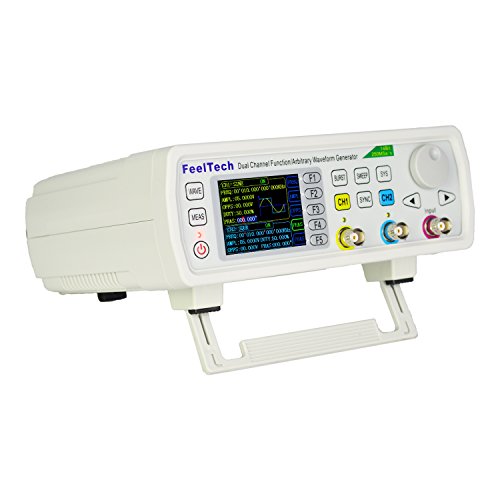
The FY6600 is housed in a compact plastic enclosure that shares DNA with the JDS6600 and MHS-5200 families. It is small enough to tuck behind a scope or sit on a shelf without dominating the bench. The front panel carries two BNC outputs, a BNC input for the counter, a USB-B port, and a rotary encoder with surrounding buttons.
The 3.5-inch LED segment display is a mixed blessing. It is bright, readable from across the room, and shows large numeric values for frequency and amplitude. But it cannot preview waveforms, so you are flying blind unless you have a scope monitoring the output. The JDS6600’s small color screen at least shows a rough waveform shape; the FY6600 gives you numbers only.
Inside, the architecture is an Altera Cyclone IV FPGA driving a pair of DAC904-series DACs ( markings sanded off by FeelTech, but pinout-identified by the community) at 250 MSa/s. The output stage uses THS3002 and AD8009 amplifiers. The EEVblog community has extensively reverse-engineered the design, producing replacement schematics and even alternate firmware. The analog chain is capable of good performance, but the stock power supply — an ungrounded, poorly regulated switching brick — injects noise that shows up on the output at high amplitudes. Replacing the PSU with a grounded, linear ±15V supply is the most common hardware mod.
Performance & Specifications Deep Dive
Sine wave output reaches 60 MHz, with square and triangle waves limited to 25 MHz and pulse/arbitrary to 6 MHz. Frequency resolution is 1 µHz, which is impressive for the price and useful for precise beat-frequency experiments. The amplitude range is 0-20 Vpp into high impedance, halving into 50 Ω.
Signal quality is good when the power supply is clean. Community measurements show 30 MHz sine purity better than 44 dB, and 1 MHz harmonic distortion below -52 dBc. For under $100, those are strong numbers. However, the output amplifiers exhibit slew-rate limiting above 20 MHz at high amplitudes, and the sine shaping filter introduces measurable loss above 15 MHz. One EEVblog user measured dB losses of 0.79 dB at 10 MHz and 1.58 dB at 60 MHz when pushing the THS3002 output stage hard.
The most criticized behavior is the 4 ns jitter on non-sinusoidal waveforms at frequencies that are not integer multiples of the 250 MHz sample clock. This is a fundamental DDS artifact, not a defect per se, but it means square waves above 5 MHz can show ragged edges unless the frequency lands on a favorable clock division. The FY6600-30 MHz variant reportedly avoids this jitter, suggesting a different sampling strategy in the lower-bandwidth model. For sine waves, jitter is negligible because the FPGA uses phase-accumulator techniques that do not suffer the same sampling alignment issues.
Software & User Experience
Front-panel operation is serviceable but not fast. The encoder lacks the tactile confidence of a Rigol or Siglent, and the menu structure for setting modulation or sweep parameters takes several button presses. The “OK” button cycles through Hz, kHz, and MHz units, which is a helpful shortcut once you discover it. Many users initially miss this and assume the feature is absent.
The PC software is Windows-only and feels like a utility from the early 2000s. That said, it makes arbitrary waveform creation dramatically easier than front-panel point-by-point entry. You can draw shapes, import CSV data, and upload to the generator in seconds. The software also exposes the frequency counter readout on screen, which is convenient. An EEVblog user noted that the Windows 10 application works mostly but crashes and loses USB connection sometimes. There is no macOS or Linux support, though the serial protocol is ASCII-based and documented by the community for custom scripting.
Firmware is the elephant in the room. Units with V3.0 firmware were prone to flash corruption that bricked the device. V3.2 and later are stable, but FeelTech never released an official recovery tool, forcing users to rely on community-developed firmware dumps and STM32 hacking guides. If you buy an FY6600 today, verify the firmware revision immediately.
Real-World Use Cases
For audio and general analog work, the FY6600 performs well. The sweep function handles filter characterization, the two channels can be phase-locked for differential drive, and the low-frequency sine purity is clean enough for THD measurements. The frequency counter mode, measuring 0.01 Hz to 100 MHz, is accurate enough to verify oscillator drift or PWM frequencies without dedicating a scope channel.
In embedded development, the TTL output provides 3.3V logic-level signals for clocking microcontrollers or simulating sensor pulses. The pulse width adjustment range of 25 ns to 4000 seconds covers everything from nanosecond glitch injection to long-duration timing tests. Burst mode supports manual, external, and channel-triggered operation, which is useful for single-shot stimulus experiments.
Where it falls short is precision RF and metrology work. The 4 ns jitter on square waves becomes visible on a fast scope when debugging high-speed digital buses. The output impedance is nominally 50 Ω but not precisely maintained across amplitude ranges, and the stock power supply noise modulates onto the output at high levels. For ham radio LO generation or high-speed serial validation, the FY6600 is borderline. It works in a pinch, but you will find yourself second-guessing whether anomalies are in your circuit or your generator.
Who Should Buy (And Who Shouldn't)
Buy the FY6600 if you are a hobbyist who wants more frequency and waveform flexibility than the JDS6600 provides, and you are comfortable with a tool that may need a power supply upgrade to reach its full potential. The $100 price is fair for the hardware capability, and the active community means most problems have documented solutions. Tinkerers who enjoy modding their gear will find the FY6600 a rewarding platform.
Do not buy it if you need plug-and-play reliability, if you run macOS or Linux and want official software support, or if you are unsettled by firmware horror stories. The risk of receiving old stock with buggy firmware is real, and FeelTech’s customer support is effectively nonexistent. For a production test environment or educational lab where downtime is costly, the Rigol DG1022Z or Siglent SDG1032X are far safer bets. Also avoid it if precise square-wave jitter matters; the DSLogic or a proper pulse generator is the right tool for that job.
Alternatives Worth Considering
The JDS6600 at $76 is the obvious budget alternative. It offers the same 60 MHz sine capability with a color screen and slightly less community baggage. The output amplifiers are different — some users prefer the JDS6600’s AD8056/AD835 chain — but the practical difference is small. If the FY6600’s firmware history makes you nervous, the JDS6600 is the safer cheap option.
The Rigol DG1022Z at $249 trades maximum frequency for signal purity and ecosystem integration. You lose the 60 MHz headline but gain a 14-bit DAC, LAN control, and Rigol scope integration. For anyone doing automated testing or analog precision work, the Rigol is worth the extra $150.
The FY6800, often found for $120-140, is FeelTech’s successor with a larger display and reportedly more stable firmware. It fixes some of the FY6600’s quirks but carries the same power supply noise concerns. If you are set on the FeelTech ecosystem, the FY6800 is the better buy unless you find a FY6600 at a steep discount.
Frequently Asked Questions
Is the FY6600 firmware bug still a problem?
Can I use the FY6600 on Linux or macOS?
Why does my square wave look jittery at certain frequencies?
Should I replace the stock power supply?
How does the frequency counter mode work?
Is the FY6600 better than the JDS6600?
FeelTech FY6600
$123.52 — 60 MHz · 2ch