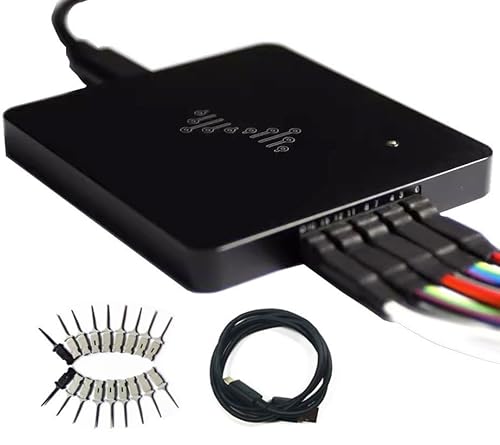
DreamSourceLab
DSLogic U3Pro16
The DSLogic U3Pro16 hits a sweet spot — 1GHz buffer sample rate and a 256MB deep buffer means you can capture long, fast sequences without losing data. Better than the LA2016 for demanding work; cheaper than the Saleae.
Key Specifications
| Channels | 16 |
| Max Sample Rate | 1000 MHz |
| Max Input Frequency | 200 MHz |
| Interface | USB |
| Software | DSView |
| Buffer Depth | 256 samples |
| Voltage Range | 1.2V – 5.5V |
| Price Range | Mid |
Supported Protocols
What We Like
- ✓1GHz buffer sample rate catches fast glitches other analyzers miss
- ✓256MB deep buffer — capture long sequences at full rate
- ✓16 channels with excellent build quality for the price
- ✓DSView software is genuinely good — not PulseView but close
- ✓Open-source based on libsigrok
Limitations
- ✗DSView software has a steeper learning curve than PulseView
- ✗$179 is a significant step up from the $80 LA2016
- ✗Overkill for basic Arduino debugging
Overview
The DSLogic Plus from DreamSourceLab occupies a compelling middle ground in the logic analyzer market. Priced around $149, it offers 16 channels, up to 400 MHz sample rate, 256 Mbits of hardware buffer memory, and a CNC-machined aluminum case that feels like it belongs on a professional bench. It is faster than the Kingst LA2016, deeper-buffered than the InnoMaker LA1010, and one-fifth the price of a Saleae Logic 8. For hobbyists and small-lab engineers who need serious digital debugging capability without the premium tax, the DSLogic Plus is one of the most interesting options available.
DreamSourceLab launched the DSLogic series via Kickstarter in 2014 and has since refined the platform through multiple iterations. The Plus model sits between the entry-level U2Basic and the USB 3.0 U3Pro16. It streams data over USB 2.0, which limits sustained throughput but provides ample bandwidth for buffered captures at full sample rate. The DSView software, a fork of the sigrok project, adds features like continuous capture and complex triggers that PulseView lacks for this hardware.
The core question is whether the DSLogic Plus delivers on its impressive specifications in daily use. A 1 GHz sample rate sounds excellent on paper, but the Plus only achieves 400 MHz in buffered mode with 4 channels, or 100 MHz with all 16 channels. The software, while capable, is not as polished as Saleae’s Logic 2. And the shielded fly wires, while a step up from budget ribbon cables, are not quite as refined as Saleae’s silicone leads. This review tests where the Plus punches above its weight and where the compromises show.
Design & Build Quality
The DSLogic Plus is immediately impressive when you pick it up. The unibody aluminum case, machined from a single block with a satin finish, gives it a rigidity and thermal stability that plastic enclosures cannot match. At 79 x 74 x 9 mm, it is thinner than a smartphone and slides easily into a project bag. The USB Type-C port on one end is modern and reversible, while the 2.54 mm header on the other accepts the included shielded fly wires.
The shielded fly wires are a genuine upgrade over the unshielded ribbon cables bundled with Kingst and InnoMaker analyzers. Each channel has its own coaxial shield and independent ground lead, reducing crosstalk and ground-loop issues when probing noisy or high-speed circuits. The clips are small enough for 0.1-inch headers and SOIC packages, though they lack the micro-grabber precision of Saleae’s probes. A 1.27 mm debug header connector is also included for direct attachment to ARM Cortex debug ports.
On the rear edge, the DSLogic Plus adds features rare at this price: an external clock input (for synchronous state-mode capture), an external trigger input, and a trigger output for synchronizing multiple instruments. These are the kinds of features that vintage logic analyzer users expect and modern budget tools usually omit. The input protection is rated for -30V to +30V, and the adjustable threshold covers 0-5V in 0.1V steps.
Performance & Specifications Deep Dive
The DSLogic Plus offers a dual-mode architecture. In buffer mode, data is captured into the onboard 256 Mbits of DDR memory before transfer to the PC. This enables 400 MHz sampling on 4 channels, 200 MHz on 8 channels, or 100 MHz on all 16 channels. In stream mode, data transfers continuously to the PC, bypassing the buffer limit but capping sample rates to 20 MHz on 16 channels, 50 MHz on 6 channels, or 100 MHz on 3 channels.
The 5 ns minimum pulse width (at 200 MHz) or 10 ns (at 100 MHz) is adequate for capturing SPI at 25-50 MHz, I2C at any standard speed, and even some lower-speed USB traffic. The 256 Mbits of memory translates to 16 M samples per channel in 16-channel mode, or 64 M samples in 4-channel mode. That is enough to capture lengthy initialization sequences or intermittent fault events without constant re-triggering.
The external clock input supports state-mode capture up to 50 MHz, meaning the analyzer samples on edges of your system clock rather than its internal oscillator. That eliminates the phase ambiguity that plagues oversampling analyzers like the Saleae, where the internal and external clocks drift relative to each other. For synchronous bus analysis — think 68000 CPU projects or FPGA state machines — this is a transformative feature.
The adjustable threshold (0-5V in 0.1V steps) handles 1.2V, 1.8V, 2.5V, 3.3V, and 5V logic families without external level shifters. Input impedance is 250 kΩ in parallel with approximately 13 pF, which is benign enough for most digital outputs but worth noting if you are probing high-impedance nodes like CMOS oscillator inputs.
Software & User Experience
DSView is DreamSourceLab’s fork of the sigrok project, customized for DSLogic hardware. It is available for Windows, macOS, and Linux, and it inherits the familiar sigrok interface: channels on the left, waveforms in the center, protocol decoders as annotations. The learning curve is moderate; if you have used PulseView, DSView will feel familiar.
DSView adds several features that PulseView lacks for DSLogic hardware. Continuous capture mode streams data in real time like an oscilloscope, updating the display constantly rather than capturing one buffer at a time. Complex trigger options include bus-value matching, duration triggers, and sequence triggers — capabilities that Saleae’s streaming architecture cannot match. An early Hackaday review praised these additions while noting that DSView was definitely a work in progress.
The rough edges are real. The Hackaday review highlighted that DSView cannot save capture setups, which is frustrating when you have carefully named 16 channels and configured decoders only to lose everything on restart. A later review by Tom Verbeure noted that buffered mode did not work reliably on his MacBook, forcing him to use stream mode. And while DSView is better than KingstVIS, it is not in the same league as Logic 2 for polish, search speed, or export convenience. The software is good enough for professional work, but it demands more patience than Saleae’s offering.
Real-World Use Cases
For retrocomputing and wide-bus debugging, the DSLogic Plus is exceptional. A vintage CPU project with 16 address lines, 8 data lines, and a few control signals fits comfortably within the 16-channel budget. The external clock input lets you sample exactly on the CPU’s clock edges, producing a state-table view that shows bus values per cycle rather than a waveform that drifts in and out of phase. A reviewer on the 68k Macintosh forum specifically praised the DSLogic for having the state-analysis features that Saleae lacks.
In FPGA verification, the 100 MHz sample rate on 16 channels captures most hobbyist and many professional designs. The complex triggers let you define conditions like "capture when address bus is between 0x4000 and 0x4100 and WR is low," which is impossible on simpler analyzers. The deep buffer means you can capture thousands of clock cycles around the trigger point, giving enough context to trace causality backward from a fault.
For embedded protocol work, the DSLogic Plus is competent but arguably overkill. SPI at 10 MHz, I2C at 400 kHz, and UART at 3 Mbps are all well within the capabilities of a $60 LA1010. The Plus adds margin and flexibility, but if your entire debugging diet is serial protocols, the extra $90 buys capability you may never use. Where the Plus earns its keep is at the margins: catching a 20 ns glitch on a motor driver, verifying setup times on a high-speed parallel bus, or state-sampling a CPU bus where oversampling analyzers fail.
Who Should Buy (And Who Shouldn't)
Buy the DSLogic Plus if you are a retrocomputing enthusiast, FPGA developer, or embedded engineer who needs 16 channels, hardware triggering, and state-mode capture for under $200. It is the most capable logic analyzer in its price class for wide-bus and synchronous work. The aluminum case, shielded probes, and external clock input are features that genuinely improve the debugging experience. If you are frustrated by the limitations of 8-channel or streaming-only analyzers, the Plus is the cure.
Do not buy it if you primarily debug simple serial protocols, if you value software polish over hardware capability, or if you need analog recording alongside digital. For pure SPI/I2C/UART work, the Kingst LA2016 at $80 or InnoMaker LA1010 at $60 handle the task adequately. For software excellence, the Saleae Logic 8 at $399 is unbeatable. And if you need USB 3.0 throughput for sustained high-speed streaming, the DSLogic U3Pro16 at $299 is the upgrade path. The Plus is a specialist tool with broad shoulders, but it is not the right choice for every bench.
Alternatives Worth Considering
The DSLogic U3Pro16 at $299 upgrades to USB 3.0, 1 GHz sampling on 8 channels, and 2 Gbits of buffer memory. It is the same form factor and software but with dramatically more speed and depth. If your work involves GHz-class signals or you simply want the headroom, the U3Pro16 is the logical next step. Tom Verbeure’s teardown praised the U3Pro16 as a Saleae alternative at one-fifth the price, with the caveat that DSView is quirky.
The Kingst LA2016 at $80 is the budget alternative with similar channel count. It offers 200 MHz sampling and 16 channels but lacks the aluminum case, shielded probes, external clock, and complex triggers. For casual embedded work, the LA2016 is the better value. For demanding or synchronous work, the DSLogic Plus justifies its premium.
The Hantek 4032L at roughly $180 offers 32 channels and 400 MHz sampling with 2 Gbits of memory. It is the choice when channel count is the binding constraint. However, the Hantek software and PulseView support are reportedly less stable than DSView, and the build quality is lower. For most users, the DSLogic Plus is the more reliable tool.
Frequently Asked Questions
What is the difference between buffer mode and stream mode?
Can I use the DSLogic Plus with PulseView?
What is state-mode capture and why does it matter?
How deep is the capture buffer in practice?
Are the probe cables really better than budget alternatives?
Does DSView save capture setups?
DSLogic U3Pro16
$179 — 16 channels, 1000 MHz